Squeezie, et tous les streamers que vous suivez sur Twitch, Kick et YouTube : StreamPulse vous prévient à la seconde où ils lancent leur live, et récupère vos points de chaîne et vos Drops pendant que vous regardez.
StreamPulse surveille la chaîne Twitch de Squeezie et vous envoie une notification sur votre ordinateur dès que son live commence, même sans onglet Twitch ouvert, tant que votre navigateur est lancé.
Comment être prévenu quand Squeezie lance un live ?
Installez StreamPulse sur Chrome, Firefox, Edge, Brave ou Opera, puis importez vos abonnements Twitch en un clic ou ajoutez squeezie à la main. Dès que Squeezie démarre, une notification s'affiche avec un son, et l'icône de l'extension indique qui est en live.
Squeezie est-il en live en ce moment ?
L'écran en haut de cette page affiche l'état de la chaîne twitch.tv/squeezie en direct : miniature du stream, catégorie et nombre de viewers quand Squeezie est en live, bannière hors ligne sinon. Il se met à jour toutes les 90 secondes.
Peut-on récupérer automatiquement les points de chaîne chez Squeezie ?
Oui. Tant qu'un onglet Twitch est ouvert sur la chaîne de Squeezie, même en arrière-plan, StreamPulse clique sur le bonus de points dès qu'il apparaît. Les Drops se réclament aussi tout seuls.
Est-ce une page officielle de Squeezie ?
Non. StreamPulse est une extension indépendante, sans lien avec Squeezie ni avec Twitch. Cette page sert seulement à suivre ses lives.
Everything your pager receives tonight.
One extension for alerts, points, Drops and a better player. Every module can be switched on or off in the settings.
Live alert, down to the second
Native notification with customizable sound and an icon badge as soon as a streamer you follow goes live, on Twitch, Kick or YouTube.
Channel points collectedReceived
The bonus is clicked as soon as it appears, as long as the Twitch tab is open, even in the background. A counter tracks the total.
Drops claimedReceived
Drops are claimed on their own, even with no Twitch tab open. No more waiting for the button.
#2000 error, player reloaded
Automatic reload on errors #1000, #2000 and #3000, player set as close to live as possible, and a latency indicator in the player controls, on Twitch and Kick alike.
Filtered chat, predictions at your fingertips
Hide keywords and users, vote on predictions via a floating overlay on the player, and identify the live tab using the streamer’s avatar.
Raid incoming
An alert as soon as a raid countdown starts, and the option to stay on the channel instead of following the raid.
A player your way
Picture-in-Picture, quality selection, volume boost and automatic player restart after an error.
Favorites in the sidebar
Your favorite streamers who are live show up at the top of the Twitch sidebar.
Missed lives, as thumbnails
The History tab keeps the lives you missed over the last 14 days, with their length and a link to the Twitch VOD.
Your list follows you, browser to browser
Multi-device sync (Settings → Data) carries your streamers, pins, settings and language to your other computer, through your browser. No account, and your points and Drops stay local.
Your YouTube time counts
Watch a live from a followed channel on YouTube: the minutes land in your stats and Recap. The “Add to StreamPulse” button also appears on YouTube and Kick channel pages.
Points and Drops history as CSV
Export the details from Settings → Backup and re-import them on another browser: merging skips duplicates. Your data stays yours.
Badges: your progress, live
In the Badges tab, the time left on minute-goal campaigns is estimated from your watch time, code rewards are labelled and new tiers in a series are flagged.
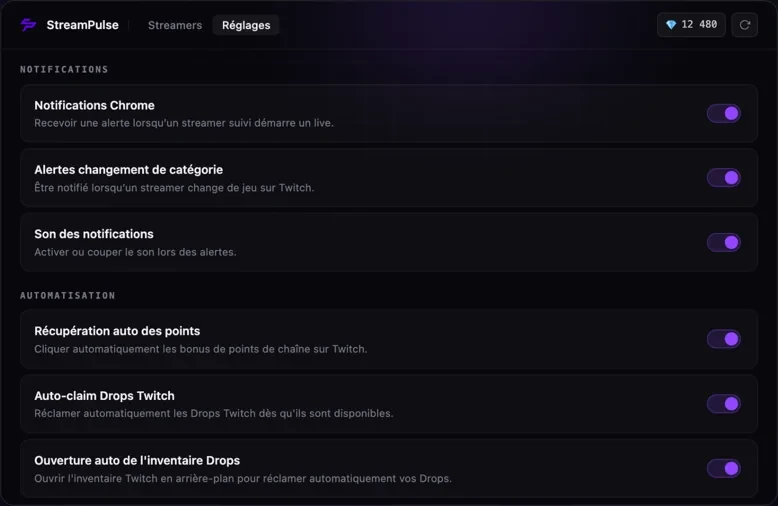
Extension settings: each automation can be turned on or off with a single tap.
No bans. No unnecessary permissions.
StreamPulse It works in your browser, using your session, while you’re watching.
No bots
It clicks where Twitch asks you to click.
Bonus points: Drops: StreamPulse clicks the buttons for you that Twitch already displays. No bots, no fake views, no shared accounts.
What the extension requests, and why
Storage
Save your settings and your list of streamers in your browser.
Alarms
Check regularly to see who’s live.
Notifications
Notify you when a streamer goes live.
Sound
Play the notification sound (off-screen document).
Tabs
Spot your Twitch, Kick and YouTube tabs.
Websites
Twitch, Kick, YouTube and streampulse.fr (configuration and community badge).
No scripts on other sites you visit, no access to your browsing history. No account required, no ads.
StreamPulse+. For viewers who miss nothing.
Everything StreamPulse already does stays free. StreamPulse+ adds tools for the most dedicated viewers and funds the development of the extension.
Smart alertsIncluded
Only get notified when a streamer starts a specific game, puts a word in their title or passes a viewer count.
Advanced recap and yearly WrappedIncluded
Hours by category, your year as a chart, an image to share.
Assisted predictionsIncluded
Your channel points bet history, win rate, automatic bets with your own rule.
25 name and badge effectsIncluded
An animated effect on your name and on your StreamPulse badge in Twitch chat: aurora, gold, neon, ember, frost, prism… Seen by every StreamPulse user.
Badge catalog and auto modeIncluded
Every Twitch chat badge you can earn right now, and an auto mode that collects them in a pinned, muted tab.
Drops and points historyIncluded
Every Drop you collected, with its date, and the channel points earned from each streamer.
Refer friends, earn moneyNew
Your friend gets €2.99 off. You earn €1 for every month a monthly friend pays and €5 for a lifetime friend, paid to PayPal from €10, plus exclusive effects. For StreamPulse+ members.
“The extension is really cool. It saves you from having a bunch of other extensions. It combines quite a few features like claiming channel points, stream alerts, drops, predictions, and on top of that, it's cross-platform!”
H
host14 déc. 2025 · Chrome Web Store
“A nice quality-of-life extension for twitch. I'm surprised there isn't more users”
Three clicks, and it’s done.
Install
Available at Chrome Web Store or via the modules at Firefox. No account required.
Import your streamers
Synchronisez vos abonnements Twitch en un clic : si vous suivez Squeezie, sa chaîne arrive avec les autres. Sinon, ajoutez squeezie à la main.
Let it beep
Keep your live stream open: alerts, points, and Drops handle themselves automatically.
Chrome, Edge, Brave, Opera, Vivaldi
Via the Chrome Web Store. On Edge, first enable extensions from other stores.
Firefox 115 and more
Via addons.mozilla.org, with the same features.
Not available on mobile or Safari
StreamPulse is a computer extension.
Questions we’re asked.
Is StreamPulse free?
Yes. Everything the extension does is free and will stay free: notifications, points, Drops, history. No ads, no account. StreamPulse+ is an optional paid upgrade that adds extra tools without taking anything away from the free version.
What is StreamPulse+?
An optional paid upgrade for dedicated viewers: smart alerts (by game, title keyword or viewer count), advanced recap and yearly Wrapped, assisted predictions, an animated badge and a special name shown in chat. €2.99 a month with no commitment, or €19 once and for all.
How do I get my StreamPulse+ key back?
It shows right after payment and arrives by email. Lost it? On the StreamPulse+ page, enter the address you paid with and we'll send it again. A key works on 2 browsers.
Can I get banned on Twitch?
No one can guarantee it: Twitch neither explicitly allows nor forbids this kind of extension. StreamPulse keeps the risk low by only clicking the buttons Twitch already shows you (points bonus, Drops), in your browser, with your own session. No bots, no fake views, no shared accounts.
Are points collected in the background?
Yes, as long as a Twitch tab is open on the channel, even in the background or behind other windows. StreamPulse clicks the bonus as soon as it appears, and a built-in counter shows you the total.
What permissions does the extension ask for?
Only what it needs: saving your settings, checking regularly who is live, showing notifications and playing their sound, and finding your Twitch, Kick and YouTube tabs. Site access is limited to Twitch, Kick, YouTube and streampulse.fr, which provides the configuration and the community badge. It cannot read or change the other sites you visit, and has no access to your history.
Which platforms are supported?
Twitch with every feature. Kick and YouTube: live tracking, notifications and a latency indicator in the player controls. On YouTube, your watch time counts toward your stats too. The extension runs on desktop, not on mobile.
Is my data secure?
StreamPulse stores your settings locally in your browser, with no account, ads or trackers. Only the community badge, which you can turn off, sends a hash of your Twitch username to our server.
Can I disable certain features?
Absolutely. Each module (notifications, points, auto-refresh, filtering) can be toggled on or off individually from the settings.
Is it resource-heavy?
No. The extension is optimized (debouncing, smart cache, lightweight architecture). Memory and CPU footprint is minimal.
Does the extension slow the browser down?
No. Modules stay idle and only run when needed. You can also disable each feature individually to reduce the footprint further.
How do I install the Twitch extension on Chrome?
Open the StreamPulse listing on the Chrome Web Store, click Add to Chrome and confirm. The extension is active right away, with no account and no browser restart.
Is StreamPulse available on Firefox?
Yes. StreamPulse is published on addons.mozilla.org and runs on Firefox 115 and later, with the same features as the Chrome build: live notifications, automatic channel points and Drops.
Does the extension work on Edge, Brave and Opera?
Yes. These browsers are built on Chromium and accept Chrome Web Store extensions. On Edge, first allow extensions from other stores.
What is the best Twitch extension for channel points?
It depends on how you watch. StreamPulse targets regular viewers: channel points claimed even with the tab in the background, live notifications and automatic Drops in a single extension instead of three.
 StreamPulse